
Membership POS system custom built for studios
Sell memberships, classes, trials, events, and retail from one point of sale: in person, online, or at a self-serve kiosk. Tied to member accounts. Built for studios, not generic stores.
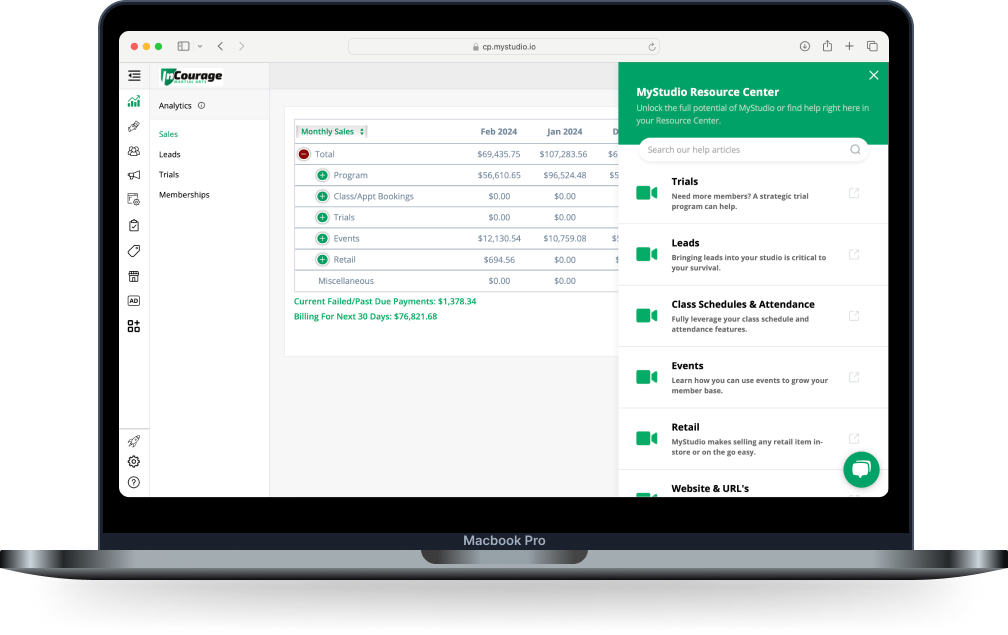
They know credit cards. MyStudio knows your members
Most gym point of sale software just processes transactions. MyStudio's membership POS system knows your students, their programs, and how they pay. One checkout for everything.
Gym POS software that already knows your students
No integrations. No separate system. Every sale in MyStudio's POS ties back to the member's account.

Sell memberships, classes, and events
One checkout for memberships, drop-ins, trials, events, camps, and custom payment plans. Every sale flows into the member's account and your reporting.
Every program, one screen.

Member-aware POS system
Search for any buyer by name. Contact info and payment methods load instantly. Easily apply discounts and purchase overrides with a few simple clicks.
Less time at the register.

Retail and pro shop, built in
Add gi, belts, sparring gear, uniforms, and branded apparel into MyStudio. Multi-item carts, discount codes, and drop-ship fulfillment.
A pro shop with no second system.

Self-serve public kiosk
Run a public-facing POS on an iPad. Families register kids, sign up for trials, or buy gear, with permissions enforced automatically.
A front desk that works unattended.

Card reader, ACH, cash, or check
Take payments by Stripe card reader, cash, check, or ACH. Choose which methods work for which sales: memberships card-only, retail open.
Families pay their way, on your terms.

Custom payment plans and manual discounts
Build custom memberships at checkout: open enrollment, fixed-term, set dates, or class packages. Discounts carry to every recurring charge.
Flexibility without breaking reporting.
From shop setup to sale in a few simple steps
Step 1: Configure your POS
Turn on the transaction types you want available: memberships, classes, trials, events, retail, custom charges. Set which payment methods each one accepts. Order a Stripe card reader from your dashboard if you want one.
Step 2: Choose staff or public mode
Launch the staff POS for use behind the counter, or the public POS for a self-serve iPad kiosk in the lobby. Permissions follow the user: admins get full access, managers run day-to-day sales, staff get the public POS only.
Step 3: Pull up the member
Search any buyer or participant by name. MyStudio surfaces their account, active enrollments, and payment method on file instantly. New customer? Capture their info on the spot and start their record.
Step 4: Ring up the sale
Select the membership, class, event, trial, retail item, or custom charge. Apply discounts. Confirm with the family. Charge the card on file, the reader, or take cash, check, or ACH. The whole interaction takes seconds.
Step 5: Records update automatically
Every sale lands in the member's account history alongside their enrollments and billing. Inventory adjusts in real time. Reporting reflects the transaction immediately. No exports. No reconciling.
Your membership POS system questions, answered
Questions we hear most often about the MyStudio membership POS system.
What is a membership POS system?
A membership POS system is a point-of-sale designed specifically for studios where customers are recurring members, and can also be one-time shoppers. Unlike generic POS systems that just process transactions, a membership POS already knows who your students are, what programs they're enrolled in, and how they pay, so retail purchases like gear, uniforms, and merchandise can be charged to a member's existing account on autopay. It connects your retail and your membership records in one platform, not two.
Do martial arts schools need a POS?
If you enroll members, run camps, or sell anything, a POS makes those transactions cleaner and more profitable. The real question isn't whether you need one; it's whether you need a separate POS system or one built into your studio platform. Most schools find that a membership-aware POS that already knows their students cuts checkout time, eliminates manual reconciliation, and makes every transaction feel as smooth as the rest of the member experience.
What can I sell through the MyStudio POS?
Memberships (recurring or one-time, with custom payment plans), classes and appointments, trials, events and camps, retail items, and custom charges like late fees or deposits. Each sale ties to the member's account automatically and updates inventory, billing, and reporting in real time.
Can I take cash, check, or ACH, not just credit cards?
Yes. MyStudio's POS supports credit card, cash, check, and ACH bank transfer. You can choose which payment methods are allowed for which kinds of transactions. For example, memberships might be card-only while retail accepts everything. ACH needs to be turned on in your payment processing settings first.
Does MyStudio offer a card reader?
Yes. MyStudio runs on Stripe and supports a Stripe card reader for in-person payments. You can order one directly from your dashboard. The reader pairs with the POS in minutes.
Can I run the POS without a staff member at the front desk?
Yes. The public POS is built for self-serve iPad kiosks at your front desk. Families can register for classes, buy memberships, purchase gear, or drop in their info as a lead, no staff required. Permissions and registration restrictions stay enforced automatically. You can run unlimited public kiosks; the staff POS is one device per login.
Does the POS work for enrichment programs, not just martial arts schools?
It does. Whether you're enrolling karate students and selling gi and belts, or running dance classes, camps, and selling uniforms and supplies, the POS handles both. You set up your programs, products, and pricing your way, and the system handles the rest.
Your pro shop belongs in your studio platform
See how MyStudio brings retail, membership, and billing together, so your front desk works harder with less effort from you.